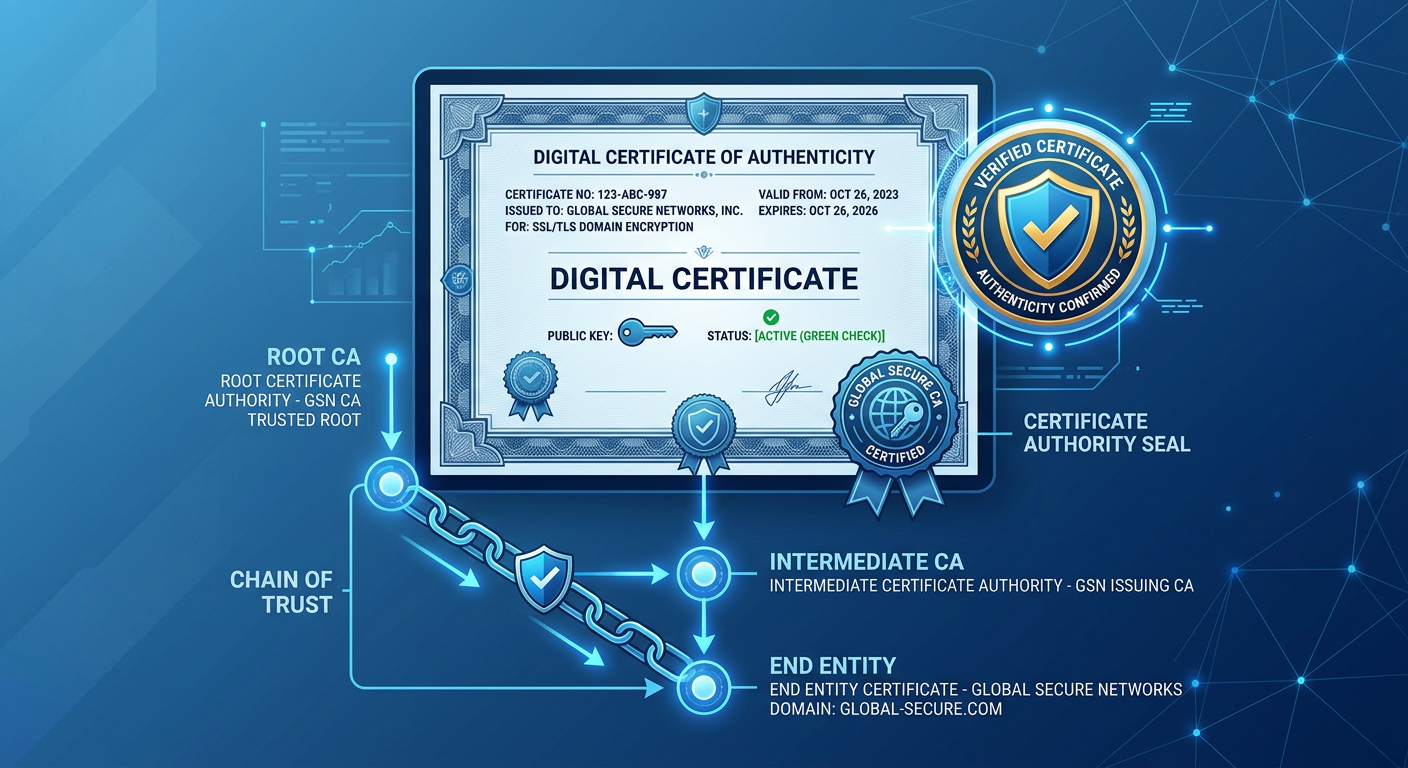
Every time you visit a website with HTTPS, your browser silently verifies a digital certificate. Every time you install a software update, your operating system checks a code signing certificate. Every time you send an encrypted email through S/MIME, a certificate enables the encryption. Digital certificates are the identity documents of the internet — and most people have never looked at one.
What Is a Digital Certificate
A digital certificate is an electronic document that binds a cryptographic public key to the identity of its owner. It answers the question: "Does this public key really belong to who claims it does?"
Without certificates, encryption would be vulnerable to man-in-the-middle attacks. You could encrypt a message, but you would have no way to verify that the public key you encrypted it with actually belonged to the intended recipient. An attacker could substitute their own public key, intercept your message, decrypt it, and re-encrypt it with the real recipient's key — all without either party knowing.
Digital certificates solve this by introducing a trusted third party: the Certificate Authority (CA). The CA verifies the identity of the key owner and signs the certificate with its own private key. Anyone who trusts the CA can verify the certificate and, by extension, trust that the public key belongs to the stated owner.
This system is called Public Key Infrastructure (PKI), and it is the trust foundation of the modern internet.
What Is Inside a Digital Certificate
Digital certificates use the X.509 format, defined in RFC 5280. An X.509 certificate contains a structured set of fields. Here is what each field means:
| Field | Purpose | Example | | --- | --- | --- | | Version | X.509 version (1, 2, or 3) | v3 | | Serial Number | Unique identifier assigned by the CA | 04:8F:2A:... | | Signature Algorithm | Algorithm used to sign the certificate | sha256WithRSAEncryption | | Issuer | The CA that issued the certificate | CN=Let's Encrypt R3, O=Let's Encrypt, C=US | | Validity Period | Not before / not after dates | Sep 17, 2026 - Dec 16, 2026 | | Subject | The entity the certificate belongs to | CN=novelcrypt.com, O=NovelCrypt | | Subject Public Key | The public key being certified | RSA 2048-bit or ECDSA P-256 | | Extensions | Additional constraints and attributes | Subject Alternative Name, Key Usage | | Signature | CA's digital signature over all above fields | RSA signature with CA's private key |
### The Subject Alternative Name (SAN) Extension
The Subject Alternative Name (SAN) extension is the most important extension in modern certificates. It lists all the domain names that the certificate is valid for. A single certificate can cover multiple domains:
``` Subject Alternative Name: DNS: novelcrypt.com DNS: www.novelcrypt.com ```
Modern browsers ignore the Common Name (CN) field in the Subject and rely entirely on the SAN for domain validation. If a certificate does not have a SAN, browsers will reject it.
### Key Usage Extensions
Key Usage extensions define what the certificate's key can be used for:
- **digitalSignature:** Signing data (e.g., TLS server authentication, code signing) - **keyEncipherment:** Encrypting keys (e.g., RSA key transport in legacy TLS) - **keyAgreement:** Key agreement (e.g., ECDH in TLS) - **keyCertSign:** Signing other certificates (only for CA certificates) - **cRLSign:** Signing certificate revocation lists
The Chain of Trust
Certificates are not trusted directly. They are trusted through a chain. At the top of the chain is a root certificate that is pre-installed in your browser or operating system. At the bottom is the end-entity certificate (the website's certificate). In between are intermediate certificates.
Here is how the chain works:
1. **Root CA Certificate:** Self-signed (signed by the root CA's own private key). Pre-installed in browsers and operating systems. Example: ISRG Root X1 (Let's Encrypt's root). 2. **Intermediate CA Certificate:** Signed by the root CA's private key. Example: Let's Encrypt R3. 3. **End-Entity Certificate:** Signed by the intermediate CA's private key. Example: novelcrypt.com's certificate.
When your browser connects to a website, the server presents its end-entity certificate and any intermediate certificates. Your browser verifies the chain:
- It checks that the end-entity certificate was signed by the intermediate CA. - It checks that the intermediate CA was signed by the root CA. - It checks that the root CA is in its trusted root store. - It checks that all certificates in the chain are within their validity period. - It checks that no certificate in the chain has been revoked.
If any check fails, the browser displays a warning and refuses to establish the connection.
### Why Intermediates Exist
Root certificates are long-lived (10-25 years) and their private keys are kept offline in highly secure facilities. Intermediate certificates are shorter-lived (1-5 years) and their private keys are on connected systems that can automatically sign end-entity certificates. This separation limits the blast radius if an intermediate key is compromised — only the intermediate needs to be revoked, not the root.
Certificate Authorities
A Certificate Authority (CA) is an organization that issues digital certificates. To be trusted by browsers, a CA must be included in the root stores maintained by:
- **Mozilla (NSS):** Used by Firefox - **Google (Chrome):** Uses the operating system root store on most platforms - **Microsoft (Windows):** Used by Edge, Internet Explorer, and Windows applications - **Apple (macOS/iOS):** Used by Safari and iOS applications
Getting included in these root stores requires passing rigorous audits (WebTrust for CAs, ETSI EN 319 411) and demonstrating secure key management practices. CAs that fail these audits are removed — as DigiCert experienced in 2017 when Google and Mozilla proposed distrusting several of their intermediate CAs for mis-issuance.
### Popular Certificate Authorities
| CA | Type | Free Certificates | Validation Types | | --- | --- | --- | --- | | Let's Encrypt | Non-profit | Yes (90-day validity) | Domain validation | | DigiCert | Commercial | No | DV, OV, EV | | GlobalSign | Commercial | No | DV, OV, EV | | Sectigo (formerly Comodo) | Commercial | No | DV, OV, EV | | Cloudflare | Service | Yes (via edge) | DV |
### Validation Types
- **Domain Validation (DV):** The CA verifies that the applicant controls the domain. Fast, automated, no identity verification. Let's Encrypt issues DV certificates. - **Organization Validation (OV):** The CA verifies the organization's identity and domain control. Requires business registration documents. - **Extended Validation (EV):** The CA performs extensive identity verification. Historically showed the organization name in the browser address bar (this display has been removed by most browsers).
PKI vs PGP Web of Trust
PKI is not the only trust model for digital certificates. PGP (Pretty Good Privacy) uses a fundamentally different approach called the web of trust.
| Property | PKI (X.509) | PGP Web of Trust | | --- | --- | --- | | Trust model | Hierarchical (CA at top) | Distributed (peer-to-peer) | | Who issues certificates | Certificate Authorities | Any user can sign any other user's key | | How trust is established | Browser/OS trusts root CAs | Users decide who to trust | | Revocation | CRL or OCSP | Key revocation certificates | | Scalability | Scales to billions (CAs handle it) | Does not scale well (social graph) | | User experience | Automatic (browser handles it) | Manual (users must manage trust) | | Failure mode | CA compromise affects all users | Compromise affects only trust paths through compromised key |
PKI won for web traffic because it scales and is automatic. When you visit a website, you do not need to manually verify the server's identity — your browser does it automatically using the pre-installed root certificates.
PGP's web of trust is more decentralized but requires users to actively manage trust relationships. This is why PGP remains important for specific communities (developers, security researchers, journalists) but never achieved mainstream adoption for email encryption. Read our PGP encryption guide for more on the web of trust.
For digital signatures, both models are used: PKI for TLS and code signing, PGP for software release verification and email.
How to Inspect a Digital Certificate
### In Your Browser
1. Navigate to any HTTPS website. 2. Click the padlock icon in the address bar. 3. Click "Certificate" or "Connection secure" then "Certificate details." 4. Review the subject, issuer, validity dates, and SAN entries. 5. Check the certification path to see the chain of trust.
### Using OpenSSL
```bash # View a website's certificate openssl s_client -connect novelcrypt.com:443 -showcerts
# View a certificate file openssl x509 -in certificate.pem -text -noout
# Verify a certificate chain openssl verify -CAfile ca-bundle.pem certificate.pem ```
Certificate Revocation
Certificates can be revoked before their expiration date if the private key is compromised, the certificate was issued improperly, or the domain ownership changes. There are two revocation mechanisms:
### Certificate Revocation Lists (CRL)
A CRL is a signed list of revoked certificate serial numbers. The CA publishes the CRL at a URL specified in the certificate. Browsers download the CRL and check if the certificate's serial number appears on it. CRLs can grow large and are updated periodically, meaning there is a window between revocation and CRL update where a revoked certificate may still be accepted.
### Online Certificate Status Protocol (OCSP)
OCSP allows the browser to query the CA in real time: "Is this certificate still valid?" The CA responds with "good," "revoked," or "unknown." OCSP is faster for individual checks but adds a privacy concern — the CA knows which websites you are visiting. OCSP Stapling (where the server includes a fresh OCSP response in the TLS handshake) addresses this.
Certificate Transparency
Certificate Transparency (CT) is a system for logging all issued certificates in publicly auditable logs. Google requires CT logging for all certificates issued by CAs trusted by Chrome. This means anyone can search for certificates issued for any domain.
You can search for certificates issued for your domain at crt.sh or Google's Certificate Transparency log. This is useful for detecting unauthorized certificate issuance — if a CA issues a certificate for your domain without your knowledge, it will appear in the CT logs.
CT was created in response to incidents where CAs issued certificates for domains they should not have. In 2011, DigiNotar was compromised and issued a wildcard certificate for Google.com, which was used to intercept Gmail traffic in Iran. Certificate Transparency makes such mis-issuance detectable.
Digital Certificates and NovelCrypt
NovelCrypt uses TLS certificates to secure the connection between your browser and the server. But NovelCrypt's security goes beyond TLS. The encryption of your data happens in your browser before it is sent to the server. Even if the TLS certificate were compromised and an attacker intercepted the traffic, they would only see NovelCrypt-encrypted ciphertext — not your plaintext data.
This is the principle of end-to-end encryption: TLS protects the transport, and client-side encryption protects the data. The digital signer tool uses RSA certificates for signing within the browser, and the RSA encrypt/decrypt tool lets you experiment with RSA public-key operations directly.
For verifying digital signatures, read our guide on how to verify a digital signature. And for understanding how symmetric and asymmetric encryption combine in real systems, see our symmetric vs asymmetric encryption guide.
The Bottom Line
Digital certificates are the identity system of the internet. They bind public keys to identities through a chain of trust that starts at pre-installed root certificates and ends at the website you are visiting. The X.509 format defines the structure, certificate authorities issue and sign certificates, and browsers verify the chain automatically. While PKI is the dominant trust model for the web, PGP's web of trust offers a decentralized alternative that remains relevant for specific use cases. Certificate Transparency adds public accountability to the system, making mis-issuance detectable. For applications that need security beyond TLS — like NovelCrypt's client-side encryption — certificates protect the transport while end-to-end encryption protects the data itself.